Airbnb Expense Tracker: Spreadsheet vs. Software
An expense tracker is only worth having if it stays current. This is a comparison rather than a recommendation: a spreadsheet can be entirely adequate for a small, simple operation, and dedicated software becomes more interesting when repeated categorization, property attribution, multi-property review, and month-after-month reporting start to feel like work you are rebuilding by hand. Nothing here is tax, accounting, or bookkeeping advice.
A spreadsheet can be an adequate Airbnb expense tracker when you have one or two properties and a simple category list. Dedicated software becomes more interesting when the same categorization, per-property attribution, and monthly review have to be rebuilt by hand each period. Neither option is bookkeeping, accounting, or tax software.
What does an Airbnb expense tracker need to do?
The job is narrower than it sounds: record operating expenses consistently, over time, in a form you can still read three months later. A tracker that is complete and boring is more useful than one that is elaborate and abandoned.
In practice that means each cost carries enough context to be placed later — the date it was incurred, the property it belongs to (or the fact that it is portfolio-wide), a category, who was paid, and the amount. A short note or context field is a reasonable addition in a spreadsheet if you find it helps.
It is also worth separating two different activities. Operational expense tracking is about knowing what your properties cost to run and comparing them. Accounting and tax filing are separate work with their own requirements, and they belong with a qualified professional. This guide stays on the operational side.
The spreadsheet approach
A spreadsheet can work well, and there is no reason to apologise for using one. It tends to fit when the operation is one property or a few, transaction volume is modest, one person maintains the file, categories stay consistent, and the owner is comfortable with formulas and tabs.
The strengths are real. A spreadsheet is flexible, familiar, quick to start, and easy to shape to your own way of thinking. You can add a column the moment you want one, and nothing has to be configured before you record your first cost.
The tradeoffs are also real, and they are tradeoffs rather than failures: the structure is maintained by you. Categories stay consistent because you keep them consistent; property comparisons exist because you build them; a new month exists because you created the tab. For some operations that upkeep is trivial. For others it becomes the part that slips.
What to include in an Airbnb expenses spreadsheet
If you are building or tidying a sheet, these columns cover the operational questions you are likely to ask later. Treat them as a spreadsheet recommendation, not a description of any particular product.
- Date. The date the cost was incurred, so it can be placed in a reporting period.
- Property. Which property the cost belongs to, or an explicit marker for portfolio-wide costs that are not tied to one location.
- Category. An operating category from a short, fixed list you reuse every month rather than invent as you go.
- Vendor. Who was paid — the cleaner, utility provider, or supplier.
- Amount. What it cost, in one currency, without mixing in unrelated charges.
- Recurring or one-time. A simple indicator can help you read a month's total, since a one-off repair and a monthly utility bill explain very different movements. This is a spreadsheet idea, not a Blueprint field.
- Note or context. A short line about what the cost was for. Useful in a spreadsheet when the vendor name alone is not self-explanatory.
- Reporting month. A derived column so a month's rows can be filtered without depending on how the date is formatted.
- Receipt reference. If you keep receipts, a reference or folder location stored wherever you keep documents. Blueprint does not store uploaded receipts or documents.
Two of these columns carry more weight than the rest. Consistent category naming is what makes a category total mean anything across months — “Cleaning” and “cleaners” in the same sheet will quietly split one figure into two. And property attribution is what lets you ask a property-level question at all; a cost recorded without a property can appear in a total while being absent from the comparison that would have explained it.
Where a spreadsheet can start to get cumbersome
These are possible friction points rather than certainties. Whether any of them matter depends on the size of your operation and how much you enjoy maintaining the file.
Repeated manual categorization
Every row is typed or pasted, and every row is an opportunity to phrase a category differently.
Category drift
Category names tend to accumulate variants across months unless something constrains them to a fixed list.
Copying formulas and month tabs
New periods often start as a copy of the last one, and formula ranges have to be checked after each copy.
Multiple properties
Property columns, filters, and per-property summaries multiply the structure you are maintaining by hand.
Rebuilding property-level comparisons
Comparing two properties for the same period may require a pivot or a set of formulas that you recreate or extend.
Unassigned and portfolio-wide costs
Costs that do not belong to one property need a deliberate convention, or they end up double-counted or dropped.
Missing entries and duplicates
Nothing in a blank cell announces itself, so completeness depends on a review habit rather than the file.
Repeating the review every month
The work is not building the view once; it is producing the same view again next month, and the month after.
The software approach
What dedicated operational software offers, conceptually, is structure that persists. The fields exist before you type; the category list is fixed; the property is part of the record rather than a column you remember to fill; and views that group and compare recorded costs are already defined for the next period.
It is worth being precise about what that does and does not imply. Software does not automatically mean automation or integrations — different products do very different things, and some do none of it. A tool can be a structured system for records you enter yourself, which is a different proposition from a tool that connects to outside accounts.
It is also a different category from accounting and tax software. A system for operating records helps you see what your properties cost to run. Preparing books or filing returns is separate work with separate requirements.
Spreadsheet vs. software comparison
The dimensions below describe how each approach behaves rather than declaring a winner. Where a row refers to Blueprint specifically, it states what Blueprint does and does not do.
- Initial setup
- Start immediately; structure is created as you go.
- Business profile and properties are configured first, then records are entered against them.
- Flexibility
- Any column, formula, or layout you want.
- A fixed expense record: date, property, category, vendor, amount.
- Category consistency
- Maintained by the person typing, unless you add validation yourself.
- Chosen from a fixed category list on the form.
- Property attribution
- A column you fill in and a convention you keep.
- Part of the expense record; a cost is assigned to a property or left as whole portfolio.
- Multi-property review
- Filters or pivots you build and extend.
- Property-level results are presented from property-attributed records.
- Recurring monthly review
- Recreated each period, often by copying the previous one.
- The same views for whichever reporting period is selected.
- Formula maintenance
- Yours to maintain as rows, tabs, and ranges change.
- Calculations are part of the system, not cells you edit.
- Record visibility
- Whatever the current layout shows.
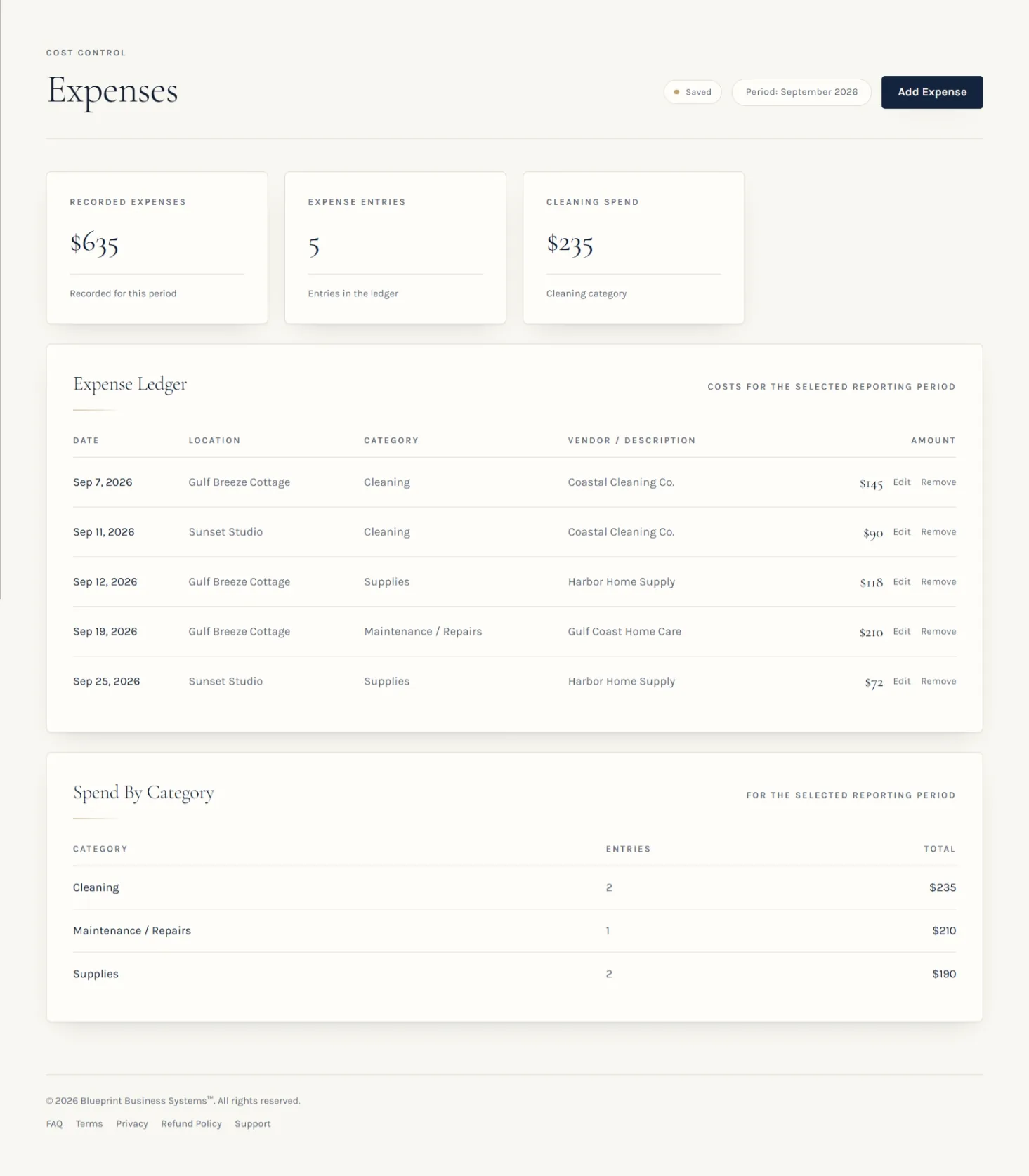
- An expense ledger for the selected period, recorded expense totals, and spend by category.
- Bank feeds and reconciliation
- Not provided; anything of the sort is done by hand.
- Not provided. Blueprint has no bank or card feeds and does not reconcile transactions.
- Tax filing and accounting
- Not provided.
- Not provided. Blueprint is not accounting or tax software and produces no tax forms.
- Receipt and document storage
- Files kept wherever you choose to keep them.
- Not currently provided. Blueprint does not store uploaded receipts or documents.
- Physical inventory counting
- Not this use case.
- Not this use case. Counting stock on a shelf is a manual activity either way.
What Blueprint actually records for expenses
An expense in Blueprint is recorded with five things: the date the cost was incurred, the property it belongs to (or whole portfolio), a category from the fixed list, a vendor or description, and an amount. There is no receipt upload and no separate note field.
The category list is fixed: Cleaning, Supplies, Maintenance / Repairs, Utilities, Platform / Service Fees, and Other. Because the list does not grow on its own, category totals stay comparable between periods.
The Expenses view shows the ledger of costs recorded for the selected reporting period, a recorded expenses total, and spend grouped by category. Where an expense is assigned to a property, that attribution is what feeds property-level operating and profitability views.
Every figure comes from what was entered. Blueprint does not import bank or card feeds, categorize transactions automatically, match payouts, or connect to Airbnb, Vrbo, a PMS, a calendar, or a financial account. It does not file taxes, produce tax forms, or give tax advice, and it does not store receipt documents.
Property-level expense tracking versus one portfolio total
A single portfolio total answers one question — what did everything cost — and quietly withholds the more useful one: which property cost that. Assigning each cost to a property is what turns a total into a comparison.
A hypothetical, for illustration only: two properties each record $6,000 of revenue in a month. One records $2,100 of operating costs, the other $3,400, largely in turnover cleaning and a mid-month repair. As one combined total the month looks unremarkable; property by property, the two are having noticeably different months.
In Blueprint, a cost is recorded either against a specific property or as whole portfolio when the propertyId is left blank. Property-level results use the expenses explicitly assigned to that property, while portfolio-wide costs are reconciled separately rather than being spread across properties by assumption.
For how those attributed costs turn into property-level results, see how to calculate vacation rental profitability.
Expense categories: consistency matters more than sophistication
A short list you apply the same way every month tends to be more readable than a long list applied loosely. These are operating categories — examples for running the business — and they are not tax categories or a statement about how any cost should be treated.
Practical operating examples: cleaning and turnover, supplies and consumables, repairs and maintenance, utilities, platform and software fees, insurance, property services, and other operating costs. Blueprint's own fixed list is narrower: Cleaning, Supplies, Maintenance / Repairs, Utilities, Platform / Service Fees, and Other.
Whichever list you use, the point is that “Cleaning” means the same thing in March as it does in September. That is what makes a month-over-month look at a category worth doing.
Supply and restocking costs often trace back to a stocking standard — the vacation rental inventory checklist covers that side.
A practical monthly expense review
A short pass at the end of each month keeps the record readable while the details are still fresh. This is a completeness check on your own records — not a bank reconciliation and not an audit.
- Confirm which reporting month you are looking at.
- Read through the expenses recorded for that period.
- Verify that each cost is assigned to the right property, or deliberately left as portfolio-wide.
- Scan category use for drift or a cost filed somewhere unexpected.
- Look for obvious duplicates and for costs you know happened but cannot find.
- Note unusual one-time items — a repair, a replacement — before drawing conclusions from a total.
- Where it is useful, compare property-level expense patterns for the same period.
For what to keep recorded through the year, see the Airbnb bookkeeping guide.
When is a spreadsheet still the right choice?
This is a genuine recommendation, not a lead-in. If you run one property or a small simple operation, your transaction volume is modest, and you are comfortable maintaining the file, a spreadsheet can cover the operational question entirely.
The clearest signal is the absence of pain. If nothing has to be rebuilt to answer your questions, if categories have not drifted, and if the monthly look takes a few minutes, the tool is doing its job. Changing systems has its own cost, and there is no reason to pay it without a reason.
If you are still deciding what a sheet should contain, the field-by-field guide is a better starting point than a rewrite. What a short-term rental spreadsheet should track.
When is expense-tracking software worth considering?
The signals are about structure rather than a property count. There is no threshold at which a spreadsheet stops being valid.
- Several properties to keep separate. Attribution has to hold across every cost, every month, for a comparison to mean anything.
- The same review, repeatedly. You are producing a similar month-end view again and again rather than once.
- Attribution you want enforced rather than remembered. The property and the category are part of the record instead of a habit.
- One place for operating records. You would rather record reservations, expenses, and operating information in one system than assemble views by hand across files.
How Blueprint fits — and where it does not
Blueprint is an operational record-keeping and visibility system for vacation-rental owners and operators. You record reservations, expenses, and operating information, and Blueprint presents that recorded information as expense, revenue, and profitability views for a selected reporting period, including property-level results.
What it is not: it is not accounting software, bookkeeping software, bank-reconciliation software, a property management system, a channel manager, a receipt-management system, a tax tool, or an inventory-counting system.
Specifically absent: bank or card feeds, transaction reconciliation, automatic categorization, payout matching, integrations with Airbnb, Vrbo, a PMS, a calendar or a financial account, receipt uploads or document storage, tax forms, tax filing or tax advice, and automated counting of physical stock.
What that leaves is a defined structure for records you enter and views that stay available period after period. Whether that is worth having depends on how much of that structure you are currently building yourself.
The takeaway
The right expense tracker is the one you will keep current. A spreadsheet can be enough, and for plenty of operations it is. Software becomes interesting at the point where the structure you need — consistent categories, property attribution, the same review next month — is being rebuilt by hand.
Either way, the operational value comes from the same place: costs recorded consistently, attributed to the right property, in a period you can name.
See what recorded expenses look like in Blueprint
Blueprint records expenses with date, property, category, vendor and amount, and presents recorded results for the reporting period you select — including property-level profitability. One-time purchase, no subscription.
More intelligent than a spreadsheet. Simpler than a full PMS.